
What to Know About the Malina Casino App and Mobile Site
Most Canadian players now open their favourite slots and live tables on a phone, so it is natural to look for a Malina Casino app before signing up. This guide explains what mobile access actually looks like today, how to add a home-screen shortcut on Android and iPhone, why unofficial download files are risky and which games, bonuses and payments work the same on a small screen.
The key point first: an official native application in Google Play or the App Store could not be verified for Canadian players at the time of writing. The platform is built to run in a mobile browser, and a home-screen shortcut gives you app-like access without installing a file. If you are new to the brand, the Malina Casino Canada overview covers games, payments and licensing in more detail.
Is There an Official Malina Casino App to Download?
Searching for an installable Malina Casino app usually returns a mix of the official website, review pages and unofficial file downloads. Only the first is a reliable route. A store listing from a verified publisher could not be confirmed for Canada, so any APK file or “installer” offered elsewhere should be treated with caution.
That does not mean mobile play is limited. The full lobby, the cashier, promotions and account settings are available in a phone browser, and a shortcut on the home screen opens the site in one tap. For most players, this gives the same practical result as an app.
| Option | Installation | Updates | What to check |
|---|---|---|---|
| Mobile browser | None | Automatic with the website | Correct address and a secure connection |
| Home-screen shortcut | Added from the browser menu | Automatic with the website | That it opens the site you intended |
| Native app | From an app store | Through the store | Verified publisher and reasonable permissions |
| Unofficial APK file | Manual, outside the store | None or unknown | Not recommended; origin cannot be verified |
How the Malina Mobile Site Works in Your Browser
The Malina mobile site adapts the desktop layout to a smaller screen. The main navigation moves into a menu, the Log In and Register buttons stay at the top, and game tiles are arranged in a grid you can scroll with one hand. Everything runs on the same account, so your balance, bonuses and limits follow you between devices.
Full lobby
Slots, jackpots, live tables and game shows.
Cashier
Deposits, withdrawals and transaction history.
Promotions
Welcome offer, reloads and Challenges.
Account tools
Limits, verification and support chat.
Because the site runs in the browser, there is nothing to update manually. New games and interface changes appear as soon as they are released, and you do not need to free up storage for a large installation.
Benefits of Browser Play Over a Separate Malina Casino Mobile App
Browser-based access is common among international gaming platforms, and it has clear advantages for players. There is no installation to approve, no permissions to grant and no version to keep updated. The same address works on Android, iPhone, tablets and computers, so switching devices takes seconds.
01
No storage
Nothing to download, so your phone keeps its space for photos and apps.
02
Always current
New games and fixes appear without manual updates.
03
Fewer permissions
The browser does not need access to contacts or messages.
04
Any device
The same account and layout work on every screen.
The trade-off is that browser play depends on a stable connection and on the browser itself being up to date. For most players, these are small requirements compared with the risks of installing an unverified file.
Adding the Malina App Shortcut to an Android Phone
On Android, a home-screen shortcut is created from the browser rather than from a store. The steps below use Chrome, which is the default browser on most Android phones; other browsers offer a similar option in their menu. The shortcut opens the site in a clean window, much like an installed Malina app.
-
Open Chrome
Launch Chrome on your Android phone and open the Malina Casino site through a trusted link. -
Open the menu
Tap the three-dot menu in the top-right corner of the browser. -
Add to Home screen
Choose Add to Home screen or Install, then edit the name if you wish. -
Open from the icon
Tap the new icon on your home screen and sign in with your usual details.
If the menu shows an Install option instead of Add to Home screen, it does the same job: it creates an icon that opens the website. It does not download a separate application file.
Why a Malina Casino App Android File Needs Extra Care
Some sites offer a Malina Casino app Android download as an APK file. Installing such a file requires allowing apps from unknown sources, which turns off one of the main protections on your phone. Files from unverified publishers can contain malware, collect personal data or imitate a sign-in page to capture your password.
- Do not disable device protections to install a file whose origin you cannot verify.
- Be wary of downloads that request access to contacts, messages or accessibility services.
- Check the publisher name on any store listing before installing.
- Remove any unofficial app you installed earlier and change your password.
An official native application could not be verified for Canadian players. Use the mobile site or a home-screen shortcut instead of an APK file from a third-party website. The Canadian Centre for Cyber Security publishes guidance on installing apps safely.
Adding Malina Casino Mobile Access to an iPhone or iPad
Apple devices also support home-screen shortcuts through Safari. The icon looks and behaves like an app, but it simply opens the website, so there is nothing to download from the App Store.
-
Open Safari
Launch Safari on your iPhone or iPad and open the Malina Casino site through a trusted link. -
Tap Share
Tap the Share button at the bottom or top of the screen. -
Add to Home Screen
Scroll the share options and choose Add to Home Screen. -
Name it and add
Keep or edit the name, tap Add and open the site from the new icon.
You can move the icon into a folder or onto the dock like any other app. If you later want to remove it, press and hold the icon and choose to remove it from the home screen; your account and balance are not affected.
Safe Sources for a Malina Casino App Download
If an official app becomes available in the future, it will be announced on the platform itself and listed under a verified publisher. Until then, a careful approach protects both your device and your account. The checklist below helps you judge any download you come across.
| Check | Safe sign | Warning sign |
|---|---|---|
| Source | Official app store or the operator’s own site | File-sharing site or messaging link |
| Publisher | Name matches the operator in the terms | Unknown developer or no name |
| Permissions | Only what a game app needs | Contacts, SMS or accessibility access |
| Sign-in | Standard login with email and password | Requests for bank passwords or codes |
When in doubt, choose the browser. It offers the same games and account tools without any of the risks that come with an unverified Malina Casino app download.
Games That Work Well on the Malina Casino Mobile Site
Most modern slots are designed for touch screens first, so they scale cleanly to a phone in portrait or landscape mode. Popular titles in the lobby include these games:






Live dealer tables and game shows also run on a phone, but they use more data and rely on a stable connection because bets are placed in timed windows. Wi-Fi is usually the better choice for live play. If the stream freezes, wait before placing another bet so you know whether the last one was accepted.
Slots
Best in portrait mode; check the stake before each spin.
Live tables
Use Wi-Fi and landscape mode for a clearer view of the table.
Sports
Live odds change quickly, so review the slip before confirming.
Claiming Bonuses Through the Malina Casino Mobile App Experience
Every promotion available on desktop can be claimed from a phone. New players receive a 100% match up to C$750, 200 free spins and a Bonus Crab chance with a first deposit of at least C$30. Returning players can opt in to the weekend reload and the weekly 50 free spins from the promotions section of the mobile menu.
Wagering rules are the same on every device: 35 times the deposit plus bonus for the welcome match and 40 times for free spin winnings. On a small screen, it is easy to miss a maximum bet limit or an expiry date, so open the bonus details in your account before you start playing. The complete list of offers is on our Malina Casino bonus page, and the current status of free rewards is explained on the no deposit bonus page.
Payments on the Malina Mobile Cashier
The mobile cashier offers the same methods as the desktop version. Canadian-facing pages show Interac, Visa and Mastercard among the payment brands, while the exact list depends on your account. Mobile deposits are convenient, but they also make it easier to add money on impulse, which is why a deposit limit is worth setting from the start.
| Step | What to check on a phone |
|---|---|
| Choosing a method | Whether it supports both deposits and withdrawals |
| Entering the amount | The currency label and the final amount before confirming |
| Bank confirmation | That any redirect goes to your own bank or card issuer |
| Withdrawals | Verification status and the transaction reference |
If a payment screen is hard to read, rotate the phone or zoom in before confirming. Never complete a transaction you cannot review properly.
How Malina Casino Mobile Compares with Desktop Play
The mobile and desktop versions share the same account, games and rules, but the experience differs in a few practical ways. Knowing where each one is stronger helps you choose the right device for each type of session.
| Feature | Phone | Desktop |
|---|---|---|
| Game library | Full lobby with touch controls | Full lobby with larger game windows |
| Live tables | Works well on Wi-Fi in landscape | Clearer view of bets and statistics |
| Reading terms | Possible, but easy to skim past details | Easier to review long bonus conditions |
| Convenience | One tap from the home screen | Best for longer, planned sessions |
Many players read bonus terms and set limits on a computer, then use the phone for short sessions. Both approaches work, as long as the same budget applies across devices.
Sports and Live Betting Through the Malina App Shortcut
The sportsbook is part of the same mobile site, so the shortcut opens access to pre-match and live betting as well as casino games. Categories include football, tennis, basketball and ice hockey, which is popular with Canadian players.
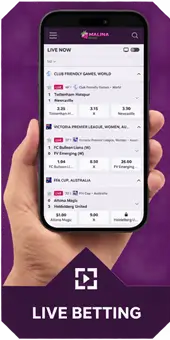





Live odds can change while you are reviewing a bet slip, and a video stream may run a few seconds behind the real event. Check the final odds and stake before confirming, and remember that casino bonus funds may not be usable on sports bets.
Data, Battery and Storage Tips for Malina Mobile Sessions
Browser play does not take up storage the way an installed app does, but games and live streams still use data and battery. A few simple habits keep sessions smooth and avoid surprises on your phone bill.
- Use Wi-Fi for live tables: video streams use far more data than slots.
- Close background apps: this frees memory and reduces lag in fast games.
- Lower screen brightness: helps the battery last through a longer session.
- Clear the browser cache occasionally: fixes many loading issues after site updates.
On older phones, slots with simpler graphics usually run more smoothly than games with heavy animation. If a game feels slow, try another title rather than raising your stake to speed things up.
Tablets and Larger Screens on the Malina Casino Mobile Site
Tablets combine the convenience of touch controls with a screen large enough for comfortable live play. The site switches between phone and desktop layouts depending on the screen width, so rotating a tablet may change how menus and game tiles are arranged. The shortcut steps for Android tablets and iPads are the same as for phones.
Signing In Quickly on the Malina App Shortcut
The shortcut opens the same sign-in page as the website, so your existing email and password work without any changes. Your browser can remember the login if you allow it, but only do this on a personal device protected by a screen lock. Our Malina Casino login guide covers password recovery, account security and the sign up process in detail.
- Use a screen lock or biometric unlock on your phone.
- Do not save the password on a shared or work device.
- Log out after playing if other people use your phone.
- Keep the operating system and browser up to date.
Fixing Common Problems with Malina Casino Mobile Access
Most mobile issues come from the connection or the browser rather than the site itself. The table lists the problems players report most often and the first thing to try.
| Problem | First thing to try |
|---|---|
| Games load slowly | Switch to Wi-Fi or close other apps using data |
| Buttons overlap | Rotate the screen or reset the browser zoom |
| Shortcut opens the wrong page | Remove it and add it again from the correct page |
| Logged out repeatedly | Allow cookies for the site and update the browser |
| Live stream freezes | Wait for the round to finish before betting again |
If none of these steps help, contact support through live chat and mention your phone model, operating system and browser version.
Staying in Control with Malina Casino Mobile Play
A phone makes it possible to play anywhere, which is convenient but also makes sessions easier to extend. The same limits you use on a computer apply to your mobile account, and setting them once covers every device.
Mobile play is for adults of legal gambling age in their province: 19+ in most provinces, 18+ in Alberta, Manitoba and Quebec. Use deposit limits and session reminders, and visit our responsible gambling page if play stops being fun. Free support is available from the Responsible Gambling Council.
Turn off notifications from the site if they encourage you to play more often than planned, and consider removing the shortcut during a break. In Ontario, authorized operators are listed by iGaming Ontario, so check the provincial rules where you live before playing.
Questions About the Malina Casino App
The Bottom Line on the Malina Casino App
For now, the Malina Casino app experience comes from the mobile site rather than a store download. A home-screen shortcut on Android or iPhone gives one-tap access to the full lobby, the cashier and every promotion, with nothing to install or update. Unofficial download files add risk without adding features, so the browser remains the recommended route.
Before you start, read the current offers on the bonus page, set your limits and keep your sign-in details private. You can always return to the Malina Casino Canada overview for games, payments and licensing information.